

 The holiday season is the most festive time of the year—crowded stores, late-night shopping, busy parking lots, and lots of running around. But with all the excitement comes a rise in theft, distractions, and moments where you might feel uneasy or vulnerable.
At CPSS, we want your holiday season to be filled with joy, not stress. Whether you’re shopping alone, meeting up with a marketplace seller, or navigating a dark parking garage after grabbing last-minute gifts, your personal safety matters.
That’s why your CPSS mobile app includes one powerful tool designed just for moments like these:
The CPSS Personal Safety Button.
🎁 Holiday Shopping Safety Tips for You and Your Family
1. Stay Aware in Crowded Stores
Holiday displays, noise, and long lines can make it easy to lose track of your surroundings. Keep your bag zipped, your phone secure, and valuables close.
2. Park in Well-Lit Areas
Try to park near entrances, under lights, or close to other vehicles. Avoid remote corners of parking lots—especially at night.
3. Hold Your Keys Before You Walk Out
Have your keys in hand as you walk to your car. It helps you get in quickly and keeps your hands free.
4. Keep Purchases Out of Sight
Put shopping bags in your trunk or cover them. Thieves target vehicles with visible purchases.
5. Trust Your Instincts
If something feels off—a person following you, a dark area, an uncomfortable interaction—don’t ignore that feeling. Acting early is smarter than acting too late.
That’s exactly when the CPSS Personal Safety Button becomes your most valuable holiday companion.
🔘 Meet the CPSS Personal Safety Button: Help Is Always in Your Hand
When your safety is on the line, fast, discreet access to help makes all the difference.
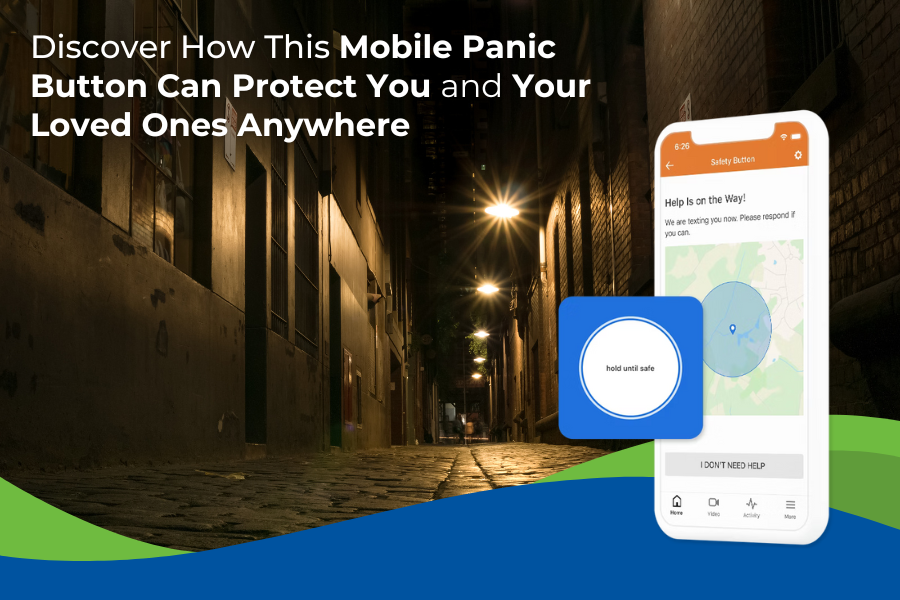
The CPSS Personal Safety Button, built right into your CPSS mobile app, gives you a direct connection to trained monitoring professionals—anytime, anywhere in the U.S.
Whether you’re:
-
Walking to your car at night
-
Shopping alone
-
Meeting a marketplace seller
-
Traveling for the holidays
-
Or just feeling uneasy
—you can get silent, immediate support without making a call or drawing attention.
How the Safety Button Works
It’s designed to be simple, fast, and discreet:
-
Press and Hold the Safety Button inside the CPSS mobile app.
-
Release to activate an alert.
-
Choose to Cancel if you’re safe.
-
Or Connect with a CPSS operator, who can dispatch first responders to your precise location using real-time GPS.
No fumbling with your phone.
No looking for contacts.
No dialing 911.
Just press, release, and get help.
Key Features You’ll Love
📱 Always with You — App-Based Convenience
No extra device to carry. If you have your phone, you have protection.
📍 Nationwide Coverage
Use it anywhere in the U.S.—perfect for shopping trips, holiday travel, and late-night errands.
🆘 Discreet, Silent Alerts
Sometimes you don’t want to draw attention. The Safety Button lets you request help quietly and safely.
👮 24/7 Professional Monitoring
Every alert connects you to trained CPSS professionals who can assist immediately, day or night.
Who Benefits Most
This feature is perfect for:
-
Individuals living alone
-
Students walking across campus
-
Commuters or rideshare users
-
Real estate agents and field workers
-
Travelers and outdoor enthusiasts
-
Anyone who simply wants an added layer of personal safety
Enjoy a Safer Holiday Season with CPSS
Your peace of mind should never take a holiday.
With smart habits and the CPSS Personal Safety Button by your side, you—and the people you love—can enjoy a safe, confident, and joyful shopping season.
📞 Call 800-949-1799 to learn more about adding the Safety Button to your CPSS system.